Cloud BIM Manager Palette

Die Cloud BIM Manager Palette ist ein leistungsstarkes, tabellenbasiertes Werkzeug, das als zentraler Knotenpunkt für die Verwaltung von nicht-grafischen Daten von Allplan-Objekten dient.
Mit dieser Palette können Sie Objekte und deren Attribute effizient anzeigen, vergleichen, validieren und ändern.
In BIM workflows, having an overview of non-graphical information is crucial.
Displaying information about multiple objects and their properties in a table format is an effective way to ensure the necessary clarity.
Die Cloud BIM Manager Palette besteht aus folgenden Bereichen:
Toolbar

 Find
Find
Durchsucht die Cloud BIM Manager Palette. You can search for up to ten terms at the same time.
 Filter
Filters the table by the selected columns.
 group
group
Opens a dialog box for selecting a column to group by. Once selected, groups appear that can be expanded or collapsed  and sorted alphabetically
  .
.
 Open the Calculate Totals dialog box
Opens a dialog box that lists all columns in the table. Now select the columns for which you want to calculate the total. After clicking OK, the totals appear in the footer of the corresponding columns.
 Add attributes
Opens the dialog box for attribute selection. Here you can assign attributes directly to objects.
Wenn ein Benutzer Attribute auswählt oder neue Attribute erstellt, werden sie sofort einem Objekt zugewiesen und in der Cloud BIM Manager Palette angezeigt.
 Export data from the Properties palette to XLSX
Exportiert die Daten der Cloud BIM Manager Palette und generiert eine Excel-Tabelle.
 IDS validation ON/OFF
Enables or disables IDS validation. When IDS validation is enabled, IDS violations are marked in red. In addition, you can filter exclusively for IDS violations.
You can also display the reason for the IDS violation as a tooltip by moving the mouse pointer over the corresponding field.
 Fill from selection
Fills the table with information about the objects you have selected in the main window of Allplan.
 Info
Info
Enthält eine kurze, allgemeine Beschreibung über die Cloud BIM Manager Palette.
Spreadsheet
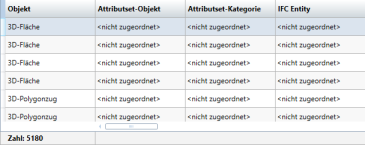
 Navigate to specific column
Right-clicking a column header opens the shortcut menu for displaying activated and deactivated columns. Each column name is followed by the Navigate horizontally to a specific column symbol. Clicking the symbol closes the shortcut menu and takes you directly to the relevant column.
Bottom Action Bar

 Load favorite
Loads a setting saved as a favorite.
 Save
Save
Saves the current setting as a favorite.
 Reset to default settings
Restores the default settings.