|
|
|
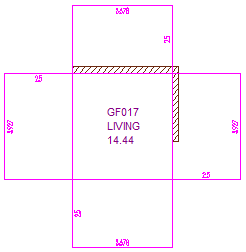
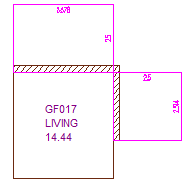
The Calculate vertical surfaces only at adjacent components option applies to rooms and stories.
When the Calculate vertical surfaces only at adjacent components option is turned off (default setting), ALLPLAN always calculates vertical finish surfaces based on the entire outline of the room because rooms are often based on 2D drawings. In the case of stories, the outside vertical finish surfaces will be calculated for the story geometry.
When you select this option, ALLPLAN calculates vertical finishing surfaces of rooms and stories only for adjacent components (walls, columns, upstands, slabs). This is useful for entrance areas or balconies, for example. This option only applies to rooms and stories that are delimited by 3D architectural elements, such as walls.
Tip: The time it takes ALLPLAN to load, compute, and update complex models depends not only on the number of objects but also on the number and type of finish specifications to be displayed. You can use the  Options - Rooms - Room finish and Representation of finish elements areas to define what you want to display. In particular, the Calculate vertical floor surfaces, floor surfaces, ceiling surfaces only at adjacent components options considerably speed up calculations.
|
(C) ALLPLAN GmbH |
Privacy policy |