|
|
|
You can snap to points on existing elements. These points include endpoints, midpoints, division points and points of intersection. You do not need to know the coordinates of these points, nor is it necessary to work with construction lines.
Allplan scans for points within a defined radius about the crosshairs. This means that when you point or click in the workspace, the system ”snaps” to points within a specific distance (the snap radius), even if the center of the crosshairs is not positioned directly over the point. You can define the size of the snap radius in  Point snap options (on the shortcut menu) in the Point snap area.
Depending on the setting in the Point snap options, the snap radius can apply to the active drawing files only or apply to drawing files open in reference mode too.
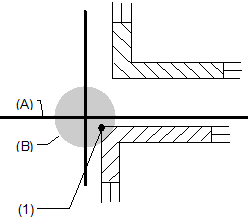
(A) Crosshairs
(B) Snap radius
(1) The program snaps to the coordinates of this point, because it is within the snap radius.
Note: In the  Options - Desktop environment - Point snap page - Point snap area, you can configure the system to emit an acoustic signal whenever you click an undefined point.
What do you want to do?
Define the size of the snap radius
Select drawing files (active or reference) for point snap
|
(C) ALLPLAN GmbH |
Privacy policy |