|
|
|
 Grupo de herramientas Terrain Model
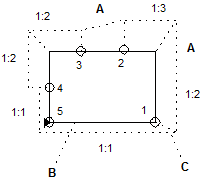
You can use this tool to draw slopes by entering the outline of the area to slope, or the edge of the slope and then its angle. You can define sloping areas with different angles of inclination.
To apply a slope
 Slope (How).
Note: You can specify whether the slope area and slope edge will be created as polygons in the  Options.
Note: After applying the slope, Allplan keeps the mesh of the original model as far as the slope edges, thus preventing cutaways that might falsify cut and fill calculations. However, the  Mesh, Optimize Grid tool cancels this effect.
| (C) ALLPLAN GmbH | Datenschutzbestimmungen |

 Tarea
Tarea