

|
|
|
You can use this tool to insert smart symbols and SmartParts in architectural openings later.
To insert a smart symbol or SmartPart in a door opening or a window opening
 Insert Smart Symbol, SmartPart in Opening (How).
Tip: For window openings with reveal, click between the reveal lines; for window openings in multi-tier walls, click the layer into which you want to insert the library element.
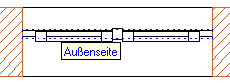
Note: The reference point is particularly important for library elements with casements and door leaves, as the position of the library element in the opening also defines the opening direction.
Tip: Increase the reference scale (status bar) to, say, 1:20. This is the scale at which the position of the casement is displayed in plan view. You can also zoom in on the library element in isometric view.
| (C) ALLPLAN GmbH | Datenschutzbestimmungen |

