

|
|
|
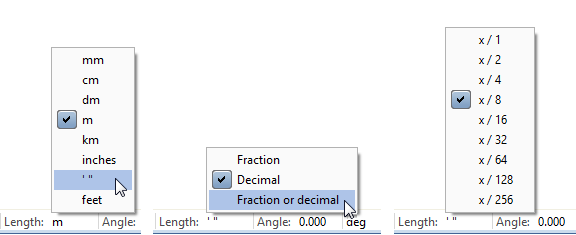
We improved the entry options for feet and inches, making it much easier for you to enter lengths in feet and inches in almost all modules. All definitions also apply to metric units.
If units differ from the global setting, such as the units for entering the symbol size or text height, Allplan displays these units in the corresponding data entry boxes.
To set the unit of length, use the status bar or open the  Options on the Desktop environment page. You can choose between Inches, Feet and inches and Feet.
When you select Feet, the values you enter are always displayed as rounded decimals. When you select Inches or Feet and inches, however, you can specify how the decimal places of the values you enter are displayed. You can find detailed information on these formats in the help for Allplan.
When you have set the format of fraction to Fraction or Fraction or decimal, you can define the Precision by selecting the fraction Allplan is to use to display the values after it has rounded them off. Allplan may also reduce the fraction.
In addition, the Options offer the Use dot in decimals as a control character option if you have set the unit of length to Inches or Feet and inches and the format of fraction to Fraction. Entering a dot is a common, simplified way to enter fractions in inches or to enter integers in feet and inches.
Selecting this option has the following effects:
When this option is not active or you add the unit ["] or ['] to a decimal, Allplan will interpret the dot as a decimal separator.
1.2 or 1.2" will result in 1 1/4"
1.2' will result in 14 1/2" or 1' 2 1/2"
Note: Regardless of whether you have selected this option or not, you can always use this type of entry with more than one dot.
For length entries in inches, 1.2.3 will result in 1 2/3"
For length entries in feet and inches, 1.2.3.4 will result in 1' 2 3/4"
For length entries in feet, 1.2.3.4 will result in 1' 2 3/4" = 1.229'
You can find further information here:
Rules for entering American units
| (C) Allplan GmbH | Privacy policy |
