

|
|
|
The new  Rotate tool replaces Solid of Revolution.
Using Rotate, you create solids or surfaces by revolving a profile about an axis.
The profile may have gaps. You can even combine open and closed profiles. The axis of rotation does not have to be in the same plane as the profile.
Allplan displays a preview of the result. You can change the angle of rotation using handles or the data entry box until you click Apply to create the solid.
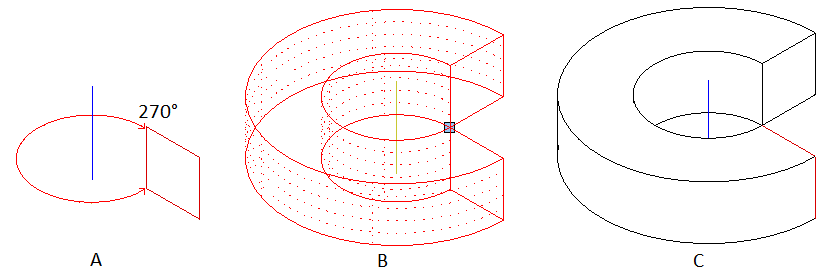
(A) Profile and axis (isometric view)
(B) Preview of solid (isometric view)
(C) Final solid (hidden line image)
Note: If you use a closed profile or revolve the profile 360°, you can choose to create a solid or a surface. An open profile always produces a surface.
| (C) Allplan GmbH | Privacy policy |
