

|
|
|
If you wanted to change the pen, line, color or layer of a door swing in earlier versions, you could not do so until you placed the door swing symbol again.
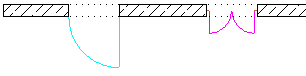
Allplan 2016 treats door swings as discrete architectural elements.
When you click the line or arc, Allplan selects the element in its entirety. You can then edit it in a single step using  Modify Format Properties, for example. You must use SmartParts if you want to assign different format properties or layers to the arc and the line.
Note: When you use a smart symbol for the door swing, Allplan 2016 - like the previous version - does not modify the invisible components of the smart symbol.
| (C) Allplan GmbH | Privacy policy |
