Pier at station point
Interactively create a structural member of the type “pier” directly related to a station point on an axis
Piers of this type of definition do not require a girder as reference member, but can be directly positioned at a certain station of an axis in a certain vertical distance (offset) from it. This position defines the origin of the pier axis.
The sequence of the definition of the stations (start/end station or top/bottom edge of the pier) does not matter.
See Piers for general explanations regarding the definition of piers.
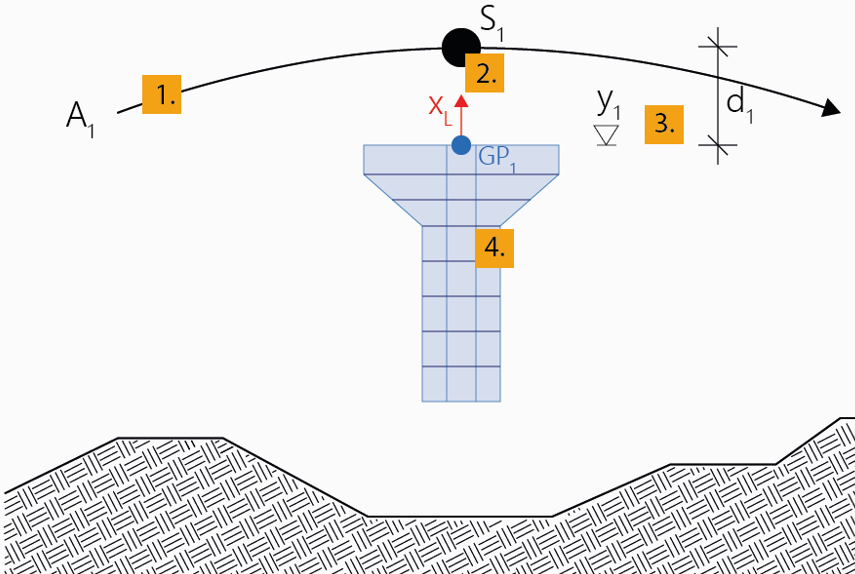
To interactively create a pier at a station point
- Click Pier at station point.
- Optionally, edit the name and the description and confirm the input with OK.
A new pier will be created in the menu Piers in the project navigation tree.
- Click the axis in the 3D View window to which the pier axis should be connected.
- Move the mouse along the axis in the View window to specify the desired station at which the pier axis should be connected, and confirm it with a mouse click.
- Move the mouse in vertical direction in the View window to specify the desired distance in vertical direction (local x-direction (global Y)) related to the previously selected position on the axis to define the position of the point of origin (Geometric Position 1) of the pier axis. Confirm it with a mouse click.
Note: Select the type of the distance to be defined (relative to the selected position on the axis or as an absolute height through this point) during input in the menu Geometric Position 1 in the Property window.
- Click on the cross section in the menu Cross Sections in the navigation tree which should be assigned to the pier axis.
- Move the mouse in vertical direction in the View window to specify the desired start position of the pier along the pier axis, and confirm it with a mouse click.
Note: Select the Type of the start station in the menu Stationing in the Property window.
- If necessary, adapt the start station in the opening input window.
- Move the mouse again in the View window to specify the desired end position of the pier or rather pier segment on the pier axis, and confirm it with a mouse click.
Note: Select the Type of the stations to be added in the menu Stationing in the Property window.
- If necessary, adapt the end station in the opening input window.
- Define the subdivision of the pier or rather pier segment via Number or Length of the individual elements in the same input window. Confirm the input with OK.
- Append further pier segments (e.g. with different subdivision or different cross section) to the existing pier (back to 9.), or quit the tool with ESC.
Note: In the course of the input procedure described above, you can anytime insert a subdivision point in an already existing pier segment by simply clicking on the desired position within the already created pier segment.


