

|
|
|
Select the calculation tasks to be generated and define the summation load cases for each construction
Construction
Name
Select the construction, for which the options should be displayed.
Description
Display of the descriptive text as defined for the construction
Count of phases
Display the number of phases defined in the construction
Calculation
Select, if the construction should be calculated or not.
Autogenerate calculation tasks
Select, if the calculation tasks of the respective types linked to the defined tasks should automatically be generated.
The results evaluated due to the generated calculation tasks are stored in load cases.
The load cases of the respective types are automatically added to the respective summation load cases.
Note: Load case results due to directly defined calculation tasks by the user (LCSELFW, LCSTRESS, LCCREEP) are not automatically added to the summation load cases! These can be added by the calculation task LCADDTO. One exception is the calculation task LOADCASE, whose load case results can be added to the superimposed dead loads by an option.
Self-weight
Select, if load cases of the type self-weight should be considered (tasks: CONCRETE, INSTBEAM).
Load case
Prefix for the load cases to be created
The respective generated load case name is set up by the prefix and the time of its definition/calculation in the construction phases (end day), e.g. SW (21).
Summation load case
Prefix for the summation load cases to be created, in which all load cases of the type self-weight are summed up each time after their calculation
The generated load case name is set up by the prefix and the time of its calculation in the construction phases (end day), e.g. SW-SUM (21).
Superimposed dead loads
Select, if load cases of the type superimposed dead load should be considered (task: LOADCASE with activated checkbox “SDL” in the Property window).
Load case
Prefix for the load cases to be created
The respective generated load case name is set up by the prefix and the time of its definition/calculation in the construction phases (end day), e.g. SDL (21).
Summation load case
Prefix for the summation load cases to be created, in which all load cases of the type superimposed dead load are summed up each time after their calculation
The generated load case name is set up by the prefix and the time of its calculation in the construction phases (end day), e.g. SDL-SUM (21).
Prestress
Select, if load cases of the type prestress should be considered (task: TENSION).
Load case
Prefix for the load cases to be created
The respective generated load case name is set up by the prefix and the time of its definition/calculation in the construction phases (end day), e.g. PT (21).
Summation load case
Prefix for the summation load cases to be created, in which all load cases of the type prestress are summed up each time after their calculation
The generated load case name is set up by the prefix and the time of its calculation in the construction phases (end day), e.g. PT-SUM (21).
Creep & shrinkage
Select, if load cases of the type creep and shrinkage should be considered.
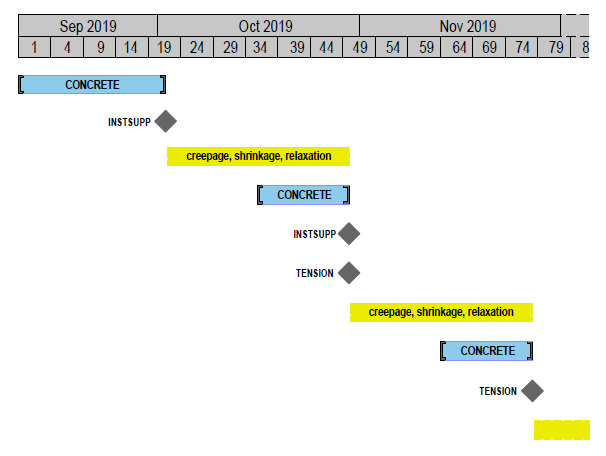
Creep and shrinkage (and if applicable relaxation for tendons) is automatically calculated after each change of the structural system (i.e. activation of members or springs) and after each application of permanent loads.
The age of the concrete at its “activation” (initial stressing) and the duration between the particular intervals are automatically taken from the definitions of the construction phases.
Alternatively, a different time for the begin of shrinkage can be determined within the calculation tasks CONCRETE and HARDEN by the argument Dshrink.
The values of the relative humidity and the temperature are defined in the Property window of the construction phases.
Note: See illustration at the end of this page.
Load case
Prefix for the load cases to be created
The respective generated load case name is set up by the prefix and the time of its definition/calculation in the construction phases (end day), e.g. CS (21).
Summation load case
Prefix for the summation load cases to be created, in which all load cases of the type creep & shrinkage are summed up each time after their calculation
The generated load case name is set up by the prefix and the time of its calculation in the construction phases (end day), e.g. CS-SUM (21).
Duration of infinite creep
Duration in days, for which creep for the time infinite should be calculated (default 36,500 days)
The time is counted from the end day of the last creep calculation.
The generated load case name is set up by the prefix of the creep load case and the end time of its calculation, e.g. CS-SUM (36,521) and additionally CS-SUM (final state).
Logarithmic time steps
Number of the subdivisions into temporal intervals on a log. scale for the calculation of the infinite creep in order to increase the accuracy for long creep periods.
Delete intermediate load cases
Delete the intermediate load cases calculated due to the input above
Total sum
Select, if the total sum of all load cases as given (and activated) above should be created each time after their calculation.
Load case
Prefix for the load cases to be created
The generated load case name is set up by the prefix and the time of its calculation in the construction phases (end day), e.g. SUM (21), SUM (36,521) and additionally SUM (final state).
ILLUSTRATION: Considering creep and shrinkage within the automatic calculation:
|
(C) ALLPLAN GmbH |
Privacy policy |
