

|
|
|
You can use the Relative height dialog box to define the height settings of architectural surfaces like floor surfaces, ceiling surfaces, paths or areas with plants.
‘Relative height’ dialog box - ‘Bottom level’ area
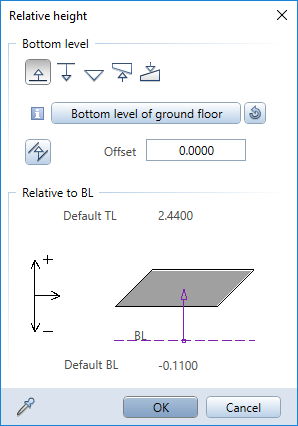
The Select reference plane button shows the default reference plane or any other reference plane in the active plane model or drawing file. The reference plane selected in this area only governs the bottom level of the modified object when  Relative to lower plane is selected.
Note: When you select  Relative to upper plane, the upper default reference plane of the drawing file always applies.
The Select reference plane button shows the name of the selected reference plane.
The component height is based on the planes or surfaces assigned. If you have not assigned a plane or surface to the bottom level of the component, the component height is governed by the reference planes in the following order: custom plane, roof plane, default planes.
Note: The ToolTip of the Select reference plane button shows the structural level of the reference plane in the plane model (for example, Building A > Ground floor > Top level of ground floor).
‘Relative height’ dialog box - ‘Top level’ area
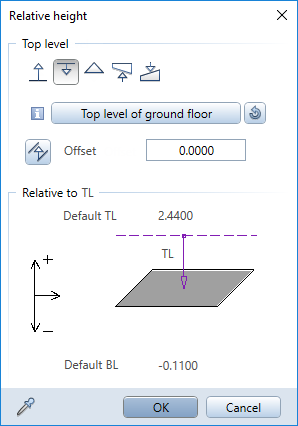
The Select reference plane button shows the default reference plane or any other reference plane in the active plane model or drawing file. The reference plane selected in this area only governs the top level of the modified object when  Relative to upper plane is selected.
Note: When you select  Relative to lower plane, the lower default reference plane of the drawing file always applies.
The Select reference plane button shows the name of the selected reference plane.
The component height is based on the planes or surfaces assigned. If you have not assigned a plane or surface to the top level of the component, the component height is governed by the reference planes in the following order: custom plane, roof plane, default planes.
Note: The ToolTip of the Select reference plane button shows the structural level of the reference plane in the plane model (for example, Building A > Ground floor > Top level of ground floor).
|
(C) ALLPLAN GmbH |
Privacy policy |
