

|
|
|
IFC Entity and IFC PredefinedType can be assigned upon creation of a component or at a later point in time.
Note: Only use the IFC Entity attribute if you need it. IFC Entity exports the element as a BREP (surface model). ALLPLAN Objects are normally automatically assigned to the appropriate IFC classes (walls, columns, ...). If the assigned IFC Entity corresponds to the native ALLPLAN object type then the program ignores the assignment, trying to transfer the element not as a BRep. This prevents loss of quality during IFC export.
Note: IFC export transfers openings in the following components: wall (IfcWall), downstand beam and upstand beam (IfcBeam), column (IfcColumn), slab (IfcSlab), roof (IfcRoof), foundation (IfcFooting), and IfcBuildingElementProxy. If a different IFC object type is assigned to the component (for example, IfcPlate instead of IfcSlab), openings will not be transferred.
To assign an IFC Entity or IFC PredefinedType to a component
 Wall (How), open the Properties dialog box, and click Attributes....
Or
Right-click an existing component and select  Modify Attributes (How) on the shortcut menu.
Or
Select one or more components, then go to the Properties palette, then go to the Attributes area, then click  Assign new attribute. In this case, continue on to step 3.
 Assign new attribute.
The IFC Entity attribute is inserted with the Undefined (or IFC PredefinedType or the <undefined>) setting into the Define and assign attributes dialog box.
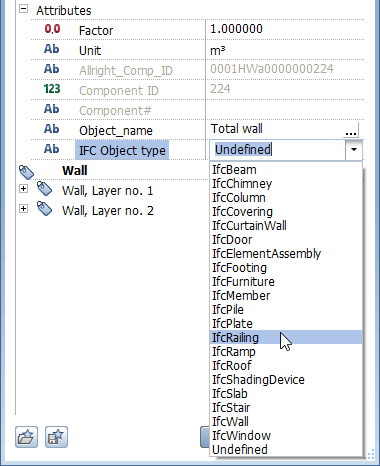
The selection list contains the 20 most common IFC Entities here. If the required attribute value is missing, click within the line, enter the required attribute value at the keyboard, and select Enter to confirm. The program saves the attribute value entered, presenting it again the next time you select attributes.

Note: There is no selection list for the IFC PredefinedType attribute. Enter the required attribute value in capital letters at the keyboard.
The component now has the required IFC Entity (or IFC object subtype) assigned to it. This attribute will be included when you export IFC data.
Undefined / <undefiniert> IFC entity
You can identify the IFC Entity attribute as not defined in two ways:
|
(C) ALLPLAN GmbH |
Privacy policy |

 Task
Task 