

|
|
|
When creating or modifying stairs, you can see symbols at the points where the steps and the line of travel intersect. These symbols are only visible in plan view. They provide information on certain geometric properties of the stair.
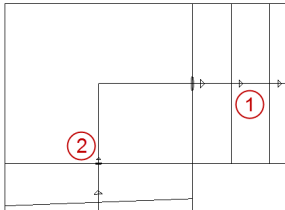
(1) Large arrow
The components (steps) are at different heights.
(2) Small arrow with a short line
Two components (steps or landings) are at the same height.
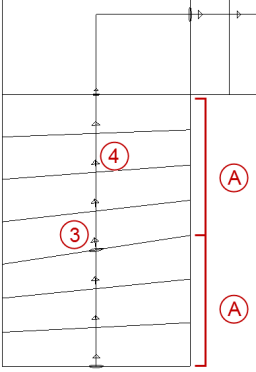
(3) Arrow with an ellipse
The angle of a single step is fixed and can be changed. The arrows are perpendicular to the step edge, pointing to the top of the stair.
(4) Arrow without an ellipse
The angle of some steps is released.
The program automatically recalculates the stair components between two fixed steps using the skew method set.
(A) Skew section between fixed components
|
(C) ALLPLAN GmbH |
Privacy policy |
