

|
|
|
 Task area Components + Interior Finish
You can use this tool to show or hide junction lines (for example, the lines where walls intersect).
To show/hide junction lines
 Show, Hide Junctions (How).
Note: Junction lines you have already hidden or shown are displayed as dashed lines in selection color when you select Show/Hide Junctions.
If the wall junction line was previously hidden, the system now displays it and vice versa.
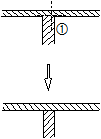
(1) Click a hidden wall junction line you want to show
Tip: Elements are always hidden in their entirety. Overlapping lines (in the case of adjacent rooms, for example) can be deleted using  Delete Double Lines.
|
(C) ALLPLAN GmbH |
Privacy policy |

 Task
Task 