

|
|
|
 Task area Annotations + Components + Interior Finish
You can use this tool to determine the heights of the top and bottom edges of any architectural component and mark them with an altitude pair.
To calculate the height of an architectural component
 Elevation Point (How).
Note: When several architectural elements overlap and the program cannot clearly identify the element at the point clicked, it automatically selects the  Selection Option for Ambiguous Elements on/off (How).
 Parameters/Data Entry Toggle to change the text parameters.
 Match Properties if you want to use a label style you have already placed.
 Label Style to use a label style for the label.
 Back to Default Label if you do not want to use the label style.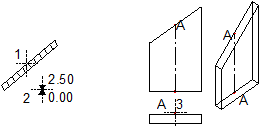
1 Click element
2 Position elevation point
3 Point clicked
A Point is highlighted in all views
|
(C) ALLPLAN GmbH |
Privacy policy |

 Task
Task 
