

|
|
|
 Task area As-completed Drawings
You can use this tool to correct an area of a scanned image by entering three points.
 3-Point Correct tool changes the file including the scanned image. Therefore, use
  Copy Image to make a backup copy first.
 Link with Scanned Image and adjust the zoom factor.
To realign a scanned image by entering 3 points
3-Point Correct (How).Note: The three reference points should not form an acute or obtuse angle.
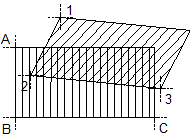
Legend:
1st reference point
(A) 1st target point
2nd reference point
(B) 2nd target point
3rd reference point
(C) 3rd target point
|
(C) ALLPLAN GmbH |
Privacy policy |

 Task
Task 