

|
|
|
 Task area Change Creating and modifying composite elements
You can use this tool to create composite elements based on one or more elements. Composite elements may not have gaps and they cannot branch. If these criteria are met, you can combine individual composite elements to produce a new, discrete one, or you can enhance a composite element by adding new elements. All associated element labels, stationing and parallel lines are deleted in the process.
Note: The program creates the composite element more quickly when you place the reference point roughly in the middle of the new composite element. The direction of the composite element is defined by the minimum x value (if equal, the y value) of the reference element, or the start point of an existing composite element.
1st example
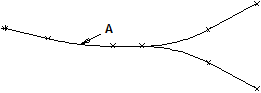
A Reference element
2nd example
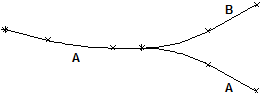
A Axis A
B Axis B
To create a new composite element
 Composite Element (How).
Tip: When you right-click in the workspace twice, Allplan selects all connected elements.
To add elements to a composite element
Composite Element (How).The name of this composite element is used for the new element.
Notes:
 Options - Terrain page - Site plan and advanced draft area). When this setting is selected, the program only takes the pen from the ‘Properties’ palette.
 Copy and Resize and
  Resize tools. Therefore, you cannot select them.
|
(C) ALLPLAN GmbH |
Privacy policy |


