

|
|
|
 Task area 3D Objects
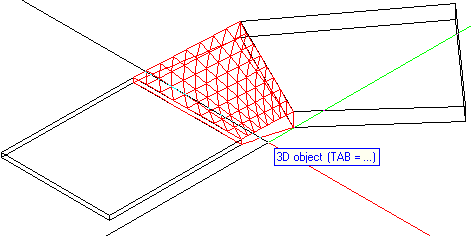
You can use this tool to create 3D surfaces that sag downward or curve upward, or 3D solids with three or four vertices.
This curving is achieved by means of triangular decomposition of the surface. You can use this tool to model awning or connect elements of different height with a surface or 3D solid, thus creating "warped" surfaces and solids.
Possible applications: ramps, floor drain applied to cementitious tanking, small terrain models or custom roof shapes applied to irregularly shaped outlines (as a 3D solid which is then converted to planes)
To create a curved surface with three or four corners
 Three-Point Canopy, Four-Point Canopy (How).
Note: The process of entering corners terminates automatically after you have specified four corners. If you want to create a three-point canopy, press ESC to finish after you have entered the third corner.
Click Apply every time you change a parameter to make sure that the canopy is calculated again. The preview is updated accordingly.
|
(C) ALLPLAN GmbH |
Privacy policy |

 Task
Task 