Tool: Axis Grid
 Tool: Axis Grid
You can use the two tabs in the Axis Grid palette to define the format properties, geometry, and label of the axis grid.
 Axes tab
Rotation angle
Enter the rotation angle of the entire grid. The horizontal label will also be placed at this angle. The position of the label depends on the settings in the Options - Text.
Format
Define the Layer of all elements of the axis grid and the display parameters (Pen, Line, Color) of the axes in the xy plane.
When you turn off the Representation - same for all axes option, you can define different parameters for the two axis directions.
x-direction, y-direction
Number, distances
Define the number and spacings of the axes in the xy plane.
Use semicolons to separate the spacings. Use commas or dots to separate the leading digits from the decimal places.
You can only enter positive values. You can add the unit; this is optional. Basic arithmetic calculations are possible:
For example: Enter 3*2.3; 46dm; 5-3.2; 4 in [m] to generate 7 axes spaced at 2.3 m multiplied by 3, 4.6 m, 1.8 m, and 4.0 m.
Angle
Enter the angle of the axes in the x-direction or y-direction based on the Rotation angle. You can only enter positive values in the first quadrant.
This box is empty if the axes have different angles due to modifications by means of handles.
Projection
Specify the value by which the gridlines project beyond the actual grid itself.
This box is empty if the axes have different projections due to modifications by means of handles.
z-direction
Number, distances
Define the spacings for copying the axes in the xy plane to the z-direction. If you want to create a planar grid in the xy plane, enter 0 for the spacing in the z-direction.
Use semicolons to separate the spacings. Use commas or dots to separate the leading digits from the decimal places.
You can only enter positive values. You can add the unit; this is optional. Basic arithmetic calculations are possible:
For example: Enter 3*2.3; 46dm; 5-3.2; 4 in [m] to generate 7 congruent axis grids spaced at 2.3 m multiplied by 3, 4.6 m, 1.8 m, and 4.0 m in the z-direction.
Display axes
Specify whether you want to create connecting lines between the congruent axis grids. These lines connect the grid nodes in the z-direction.
Label tab
Define parameters for the label of the axis grid. You define the Numbering and its starting value and label, the Orientation, and the Position separately for each axis direction. The settings for Text parameters, Color, Border, and Text offset apply to both directions (if the Representation - same for all axes option is selected).
The label is always horizontal, regardless of the angles of the axes. To place the label at an angle, you must define the rotation angle of the grid.
x-direction, y-direction
Numbering
Specify how you want to number the axes. For better orientation, element info displays the numbering next to the element name.
starts with
This entry depends on the Numbering selected.
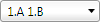 the value 10.F
orientation
Define the direction in which you want to label the axes.
Mark
Specify whether and where you want to label the axes.
Text parameters
Define the parameters for the text in the label.
Color
Select the color of the label. This color is only visible when the Color stands for pen option is turned off in  Show/Hide.
Border
Specify whether you want to apply a rectangular or circular border around the label.
Text offset
Enter the offset between the label and the gridline.
Attributes
Grid name
You can enter any name for the axis grid here; this name will also be saved in favorites as a property of the grid.
Buttons in the border of the palette
You can find the following tools in the lower border of the palette:
 Load favorite: You can select and load an axis grid favorite file (*.vdfanfx) you have already saved.
 Save as a favorite: You can save the current definitions as an axis grid favorite (*.ansfnfx).
 Restore basic settings: You can restore the default settings.
|
(C) ALLPLAN GmbH |
Privacy policy |