Tool(s): Replace Plant Objects
 Tool(s): Replace Plant Objects
To replace a single smart symbol or plant object with another smart symbol or plant object
 Replace Plant Objects (How).
This replaces only the selected smart symbol or plant object.
Note: You can use the Label option in the Input Options to specify whether labels are also replaced (option selected) or not (option not selected).
Note: The program replaces the instances that are in the current drawing file and in drawing files open in edit mode.
Note: The setting for Resize smart symbol has an effect on the substitute object when you Replace Plant Objects. If the original plant object was defined and placed with this option being selected, the substitute object behaves in the same way even if it was defined with this option being not selected.
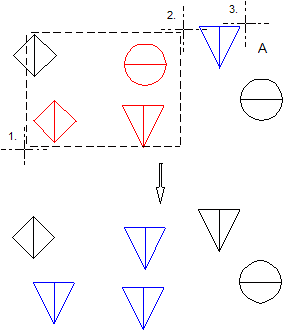
A: plant object 2 or plant object from catalog
|
(C) ALLPLAN GmbH |
Privacy policy |

 Task
Task