|
|
|
 Task area Roof
You can use this tool to create roof beams.
To place a roof beam
 Roof Beam (How).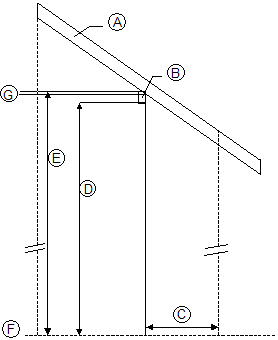
(A) Rafters
(B) Roof beam
(C) Spacng - enter a distance in plan (depends on the roof beam’s offset direction)
(D) Bottom - enter the height relative to the bottom of the roof beam
(E) Top - enter the height relative to the top of the roof beam
(F) Datum level (plan)
(G) Insertion depth of beam
Note: You can only define the insertion depth in the  Properties if you clicked a rafter when defining the height of the roof beam.
Note: If you only have the roof beam’s dimensions (width, height, and insertion depth) and you do not know the height at which to place the roof beam, ALLPLAN automatically calculates the position of the roof beam in plan. To do this, use Spacng, Bottom and Top in the input options.
|
(C) ALLPLAN GmbH |
Privacy policy |

 Task
Task