|
|
|
Explanation of terms |
|
License |
Licenses include a number of seats |
Seats |
Number of seats = number of users who can use this license |
Entitlements |
A license entitlement groups licenses. |
In the Licenses area, you can
This table describes the header line in the following illustration:
1st Header Licenses |
|
License |
The available license(s) |
Quantity |
Number of seats included in the licenses. |
In use |
Number of seats currently in use. (At the time this table was called up). |
Reservations |
Number of seats reserved for specific users |
Available versions |
The license can be used with the current or an earlier Allplan version. |
Type |
Type of license
|
Subscription |
Subscription renewal interval, i.e. from when to when is the license valid? |
Validity |
Start date of the agreement. Canceled agreements have an end date. |
Assigned groups |
Number of groups that have access to the included licenses. |
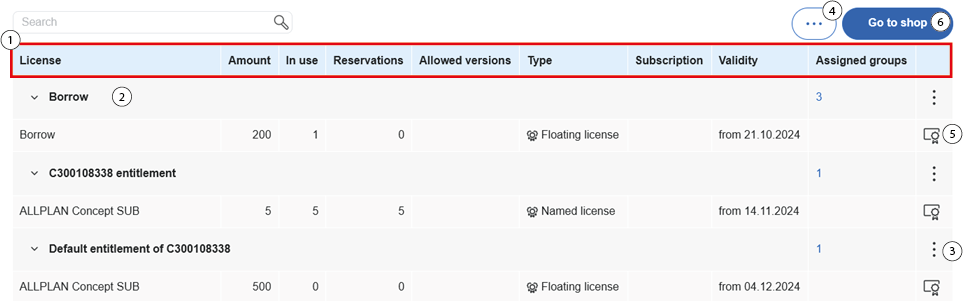
This table describes the other areas in the figure above
2 |
Area with the licenses to which every employee of a customer has access. Licenses are issued on a first come, first serve basis. |
3 |
Open submenu manage group, rename entitlement, delete entitlement. Note: Only a user with administrator rights has access to this area. |
4 |
Open the create entitlement and move licensesubmenu. |
5 |
Reserved space area is opened |
6 |
Button to open the Allplan store |
|
(C) ALLPLAN GmbH |
Privacy policy |