|
|
|
Below you will find brief instructions for licensing via your Allplan ID. You can find further information in the licensing help in the userssection.
How to license Allplan 2025
Your standard Internet Explorer opens.
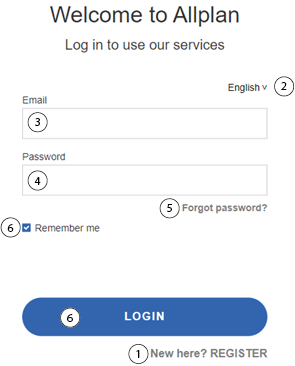
1 |
If you do not have an Allplan ID yet, you can click here to register for an Allplan ID. |
2 |
Setting the language |
3 |
E-mail input field |
4 |
Password input field |
5 |
If you have forgotten your password, you can request a new password here. |
6 |
Login button and checkbox to stay logged in. |
Allplan 2025 starts.
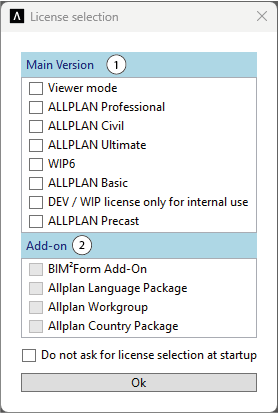
Note: Add-ons are not available for every license and certain add-ons are only available for certain licenses.
You can now use Allplan 2025 as usual.
Note: When you close Allplan 2025 or log out, your license is automatically returned to the server.
|
(C) ALLPLAN GmbH |
Privacy policy |