|
|
|
Below you will find brief instructions for licensing via your Allplan ID.
How to license Allplan 2025
Your standard Internet Explorer opens.
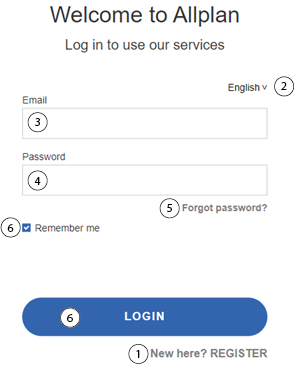
1 |
If you do not have an Allplan ID yet, you can click here to register for an Allplan ID. |
2 |
Setting the language |
3 |
E-mail input field |
4 |
Password input field |
5 |
If you have forgotten your password, you can request a new password here. |
6 |
Login button and checkbox to stay logged in. |
Allplan 2025 starts.
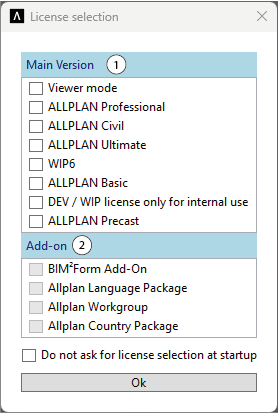
Note: Add-ons are not available for every license and certain add-ons are only available for certain licenses.
You can now use Allplan 2025 as usual.
Note: When you close Allplan 2025 or log out, your license is automatically returned to the server.
|
(C) ALLPLAN GmbH |
Privacy policy |