Tools: Column
 Tools: Column
To create a round column
 Column (How).
 Properties:
 Round outline.
Tip: Use segments in circle to define the number of segments for the round column. You can enter values between 20 and 40; the default setting is 36. In some cases, it might make sense to reduce the number of segments. For example, think of large rooms with numerous columns, such as underground water reservoirs.
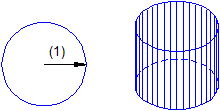
Figure: Column with round outline; (1) radius; segments in circle = 36
|
(C) ALLPLAN GmbH |
Privacy policy |

 Task
Task