|
|
|
Note: The following explanation for the amended adjustment of bent bars on  connections and
  divisions only applies to connections and divisions with a new, selected option called Lateral concrete cover with bending shapes where bent bars are present.
On a wall (iWall), on which connections and divisions created by joints with a profile (e.g. casting joints), the bent bars that may reach up into the area of the joint if necessary, reach into the connection as no monitoring of the concrete cover takes place for the corresponding bar segment of the bending shape. Under  Basic reinforcement,... and on the Basic reinforcement tab, the lateral concrete cover of a reinforcement unit (= A in the following diagram) that is set is generally only checked in the area around the straight, even mesh.
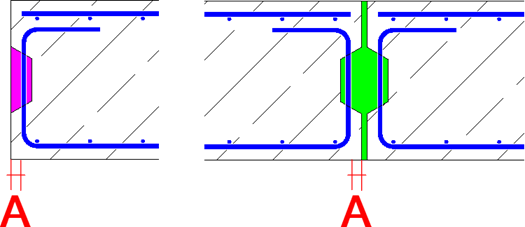
This has now been changed such that under Basic reinforcement,... on the Basic reinforcement tab, the Lateral concrete cover of a reinforcement unit (= A in the following diagram) set in the area of the bending shape can be included when monitoring the lateral concrete cover and the bars can be shortened if required if the bending shape reaches into the profile.
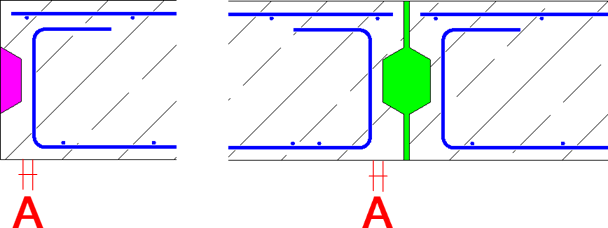
In this case, in
the dialog boxes for Connections and Divisions, the additional option Lateral concrete cover with bending shapes can be selected and the desired Lateral concrete cover (= B with connections or C with divisions in the following diagram) can be defined. You can therefore, for example, specify various lateral concrete covers for connections to corners, wall ends or mandatory joints as well as the joints. If the reinforcement should stand in the area of the joint then negative values can also be specified for the lateral concrete cover!
Note: Regardless of the walls involved in the connection, only one value can be entered in the dialog at all times for the connections! This applies to all bending shapes involved.
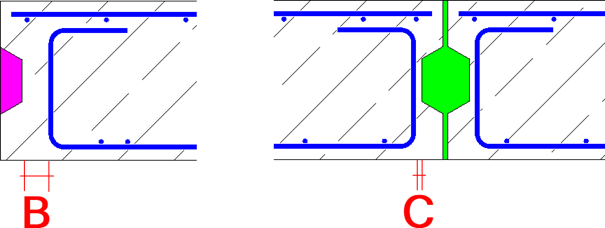
If the check box remains inactive or this is a bar without a bending shape, then under Basic reinforcement,... on the tab Basic reinforcement, the Lateral concrete cover of the reinforcement unit that was set will be taken into account. This is the default setting of the connections in question due to capacity-related reasons.
Note that the following rules apply to layer shortening/extension on the lower or upper edge of the element:
Basic reinforcement,... on the Basic reinforcement tab, the Lateral concrete cover of a reinforcement unit is generally checked only in the area around the straight, even mesh!Note: Within the favorites for Connections and the Divisions , these new and additional input parameters are available for the Lateral concrete cover with bending shapes option. The settings can then be saved or loaded via  Save as a Favorite or
  Load favorite at this point. However, available favorites must be amended as a one-off measure if required and saved once again!
|
(C) ALLPLAN GmbH |
Privacy policy |