|
|
|
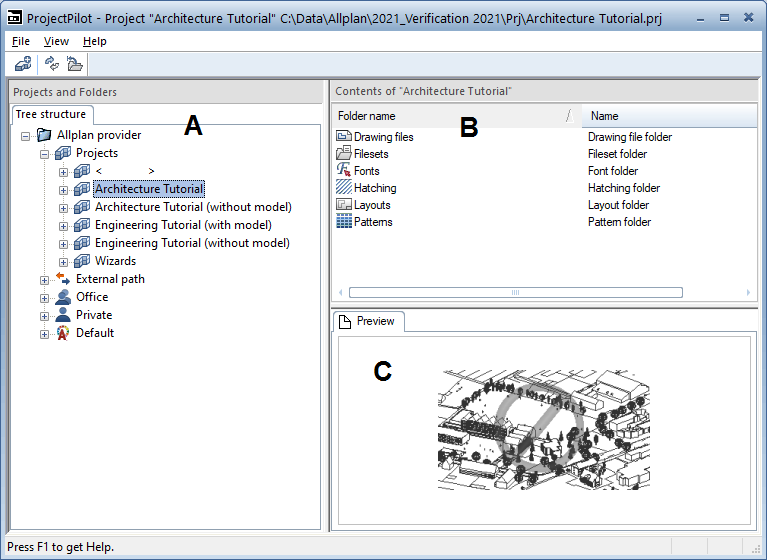
Left window (A)
The left window shows the projects and folders in a tree structure. The current project is selected and open. Click the plus sign (+) to display the levels in a folder. Click the name of a folder to display its contents in the right window.
By double-clicking, you can display the contents of the folder and open it at the same time.
Right window (B)
The right window shows the folders and documents in the selected node (in the left window). You can sort the documents by clicking the title of a column. Right-click in the background to display the documents as a list or as icons.
Preview (C)
You can see the currently selected document (drawing file, layout) in the preview. To move the preview, click it with the middle mouse button and drag. Use a selection rectangle to zoom in on an area in the preview. Double-clicking with the middle mouse button restores the preview to its original size. Alternatively, select the * key on the numeric keypad.
To display an isometric view: use the number keys on the numeric keypad. Check that the Num Lock key is active as you do so.
|
(C) ALLPLAN GmbH |
Privacy policy |