|
|
|
Entering a  Curved Wall works just like entering a 2D circle based on two points and the radius.
It is now easier for you to enter curved walls: As soon as you click the first point, you can see the preview complete with all construction layers and surface elements. By the way, you do not need to enter the first point again when you have switched from another wall type to the curved wall.
After you have entered the end point, you can see two auxiliary lines in construction-line color. Click a point to define the radius or enter it in the dialog line. You can change the radius as long as you do not select the Enter key.
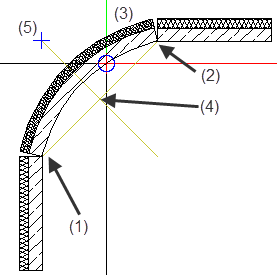
(1) Connecting point = starting point of linear component
(2) Connecting point = end point of linear component
(3) Preview of curved wall is attached to the crosshairs
(4) Center of circle
(5) Point symbol marks the radius on the perpendicular bisector
When you have found the radius, you can also click in the workspace - instead of selecting the Enter key - to define the offset direction of the curved wall.
|
(C) ALLPLAN GmbH |
Privacy policy |