

|
|
|
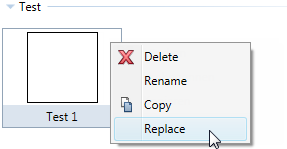
It is now easier to replace existing symbols in the Symbols library.
All you need to do is open the shortcut menu of the symbol and click Replace:
Note: You cannot replace symbols in the Default folder.
The dialog box for saving elements as symbols opens. You can now save the new symbol, replacing the old one.
| (C) Allplan GmbH | Privacy policy |