

|
|
|
In earlier versions, there were different tools for drawing 3D line elements. You can now find all these functions in the  3D Line tool:
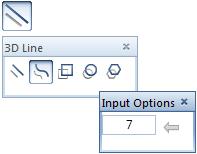
This tool combines the well-known functions for creating a  3D Rectangle,
  3D Circle or
  3D Polygon as well as the new
  3D Spline function:
Using the input options, you can specify the number of points in segment, that is, the number of points between two control points: the higher the value, the smoother the spline. You can specify the individual points by entering values in the dialog line or by clicking points in plan, elevation or isometric view.
Do the following:
Open 3D Line and select the 3D line element you want to draw. The program provides specific input options appropriate to the line element you are creating so that you can customize the element for your needs.
| (C) Allplan GmbH | Privacy policy |
