Window opening parameters
The parameters you can set up depend on the number of construction layers in the wall and whether you want to include reveals in the opening. (You can make this setting in the Parameters area.) Facing on the right/left is taken into account in the reveals.
Type
You can define a reveal style here for walls with multiple construction layers.
Select one of the types presented:

Parameters
Create reveal element
You can choose to show or hide the reveal here.
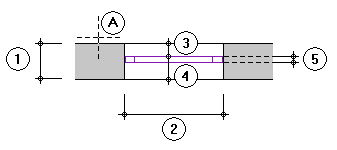
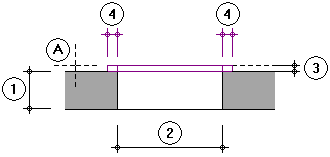
Depending on the type of reveal you have selected, four different parameters are available. The abbreviations are explained in the legend.
Note: The reveal element is only created when you enter a Window depth.
Outer reveal, Inner reveal, Depth
Reveal element outside the wall
When you enable this option in addition to Create reveal element, you can specify whether the reveal element is drawn beyond the window opening in the wall. The inside and outside options apply to the direction in which the window is entered.
Legend
The abbreviations used in the preview are explained here.
Open/save favorite file
When you want to save a defined reveal as a favorite file, click  in the tab.
To retrieve a favorite file, click  .
.
Input side of opening width
In the case of walls with multiple construction layers in conjunction with reveal types with facing, you can specify the opening side to which the opening width entered is to apply .
| (C) Allplan GmbH | Privacy policy |